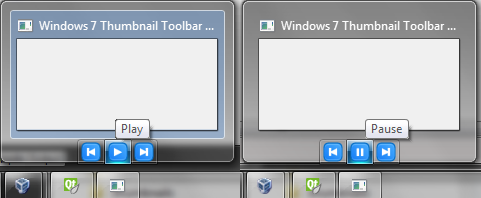
Missing definitions and declarations
MINGW GCC doesn't have all needed definitions and declarations to create a windows 7 thumbnail toolbar. That is why they need to be defined. I've explained how I did it in my previous post. You can browse the definitions file here.
Project settings
It is needed to add extra linkage libraries options to the linker.
LIBS += libcomctl32 libole32
Creating the thumbnail toolbar
In short you need to do the following:
1) Create an instance to the ITaskbarList3 COM interface
2) Create a list of images and add it to the thumbnail toolbar
3) Create a list of thumbnail toolbar buttons and add it to the toolbar
4) Update the buttons or the images when needed
What you can do:
1) Show/hide, disable/enable, change button details, update the image list
2) Have a thumbnail toolbar per program's window
What you can't do:
1) Add more than 7 buttons to the toolbar
2) Remove the toolbar (it will be destroyed when the window associated to it will be destroyed.)
Initialize the ITaskbarList3 COM interface
Firstly you need to implement your own winEvent function. This can be done by overriding the QMainWindow's winEvent protected function.
class MainWindow : public QMainWindow
{
//...
protected:
bool winEvent(MSG * message, long * result);
//...
};
In order to initialize the ITaskbarList3 COM interface it is needed to register the
"TaskbarButtonCreated" event.
//..
unsigned int messageId = RegisterWindowMessage(L"TaskbarButtonCreated");
//..
When the event is registered, it is possible to obtain access to ITaskbarList3.
Putting all together:
//...
bool MainWindow::winEvent(MSG * message, long * result)
{
static UINT taskBarCreatedId = WM_NULL;
if (taskBarCreatedId == WM_NULL) {
taskBarCreatedId = RegisterWindowMessage(L"TaskbarButtonCreated");
}
if (message->message == taskBarCreatedId) {
//initialize the ITaskbarList3 interface
}
return false;
}
Initializing the Interface
//..
void MainWindow::W7ToolbarInit() {
HRESULT hr = CoCreateInstance(CLSID_TaskbarList, NULL, CLSCTX_INPROC_SERVER, IID_ITaskbarList3,
reinterpret_cast<void**> (&(m_w7toolbar)));
if (SUCCEEDED(hr)){
hr = m_w7toolbar->HrInit();
if (FAILED(hr)) {
m_w7toolbar->Release();
m_w7toolbar = NULL;
}
}
}
//..
Create the list of images
The images I used in the project were PNG files 20x20 pixels, 32 bit, with transparency.
Create the image list to hold 4 images:
HIMAGELIST himl = ImageList_Create(20, 20, ILC_COLOR32, 4, 0);
Add the images to the list:
QPixmap img;
QBitmap mask;
img = QIcon(":/back.png").pixmap(20);
mask = img.createMaskFromColor(Qt::transparent);
ImageList_Add(himl, img.toWinHBITMAP(QPixmap::PremultipliedAlpha), mask.toWinHBITMAP());
//repeat the same thing for the rest of the images
Set the thumbnailtoolbar's image list to the :
m_w7toolbar->ThumbBarSetImageList(this->winId(), himl);
"this" is a pointer to a QMainWindow object, but it also can be a QWidget pointer.
Free the allocated memory:
ImageList_Destroy(himl);
Add the buttons
Each button structure holds information about the button. Such as image index, the index from the image list, tool tip text, state, visibility and other flags.
It is important to remember, the thumbnail toolbar can't hold more than 7 buttons.
Let's say we want to have three buttons:
class MainWindow : public QMainWindow
{
//..
THUMBBUTTON m_thbButtons[3];
//..
};
Initializing and adding the buttons:
#define IDTB_FIRST 3000
void MainWindow::W7ToolbarButtonsInit() {
QString tooltips[3] = {"Prev", "Play", "Next"};
for (int index = 0; index < 3; index++) {
wcscpy(m_thbButtons[index].szTip, tooltips[index].toStdWString().c_str());
//the ID of the button
m_thbButtons[index].iId = IDTB_FIRST + index;
//the image of the button, index from the image list
m_thbButtons[index].iBitmap = index;
//show tooltip and use the bitmpap index
m_thbButtons[index].dwMask = (THUMBBUTTONMASK)(THB_BITMAP | THB_FLAGS | THB_TOOLTIP);
//set the button enabled
m_thbButtons[index].dwFlags = (THUMBBUTTONFLAGS)(THBF_ENABLED);
}
//set the buttons
m_w7toolbar->ThumbBarAddButtons(this->winId(), 3, m_thbButtons);
}
Once the buttons are added, they should be visible.
Catching the thumbnailtoolbar click events
When a button is pressed, an event with the button's id is generated. These events can be caught in the winEvent function.
//...
bool MainWindow::winEvent(MSG * message, long * result)
{
static UINT taskBarCreatedId = WM_NULL;
if (taskBarCreatedId == WM_NULL) {
taskBarCreatedId = RegisterWindowMessage(L"TaskbarButtonCreated");
}
if (message->message == taskBarCreatedId) {
W7ToolbarInit();
W7ToolbarSetImages();
W7ToolbarButtonsInit();
} else switch (message->message){
case WM_COMMAND:
{
//get the button index
int buttonId = LOWORD(message->wParam) - IDTB_FIRST;
if ((buttonId >= 0) && (buttonId < 3)) {
qDebug() << "Button " << buttonId << " was pressed";
if (buttonId == 1) { //if "Play|Pause" was pressed
if (m_thbButtons[1].iBitmap == 1) {
//set the Pause image index
m_thbButtons[1].iBitmap = 3;
wcscpy(m_thbButtons[1].szTip, L"Pause");
} else {
//set the Play image index
m_thbButtons[1].iBitmap = 1;
wcscpy(m_thbButtons[1].szTip, L"Play");
}
//update the thumbnailtoolbar
m_w7toolbar->ThumbBarUpdateButtons(this->winId(), 3, m_thbButtons);
}
}
break;
}
default:
return false;
}
return false;
}
The code can be downloaded from here.
The screenshot can be seen below: